

You’re calling an API. The response comes back. You try to access response.user.name and get nothing. Or worse, undefined.
You check the data. It looks like JSON. But it’s actually a string shaped like JSON. That’s the catch.
This happens all the time in real-world development. An API returns a stringified payload, localStorage gives you a raw string, a webhook sends a text body and suddenly your code breaks because you never converted it into an actual JSON object.
This guide walks through exactly how to convert a JSON string to a JSON object in JavaScript, Python, and PHP with clean examples, common traps, and best practices.
What’s the Difference Between a JSON String and a JSON Object?
Quick clarification before the code.
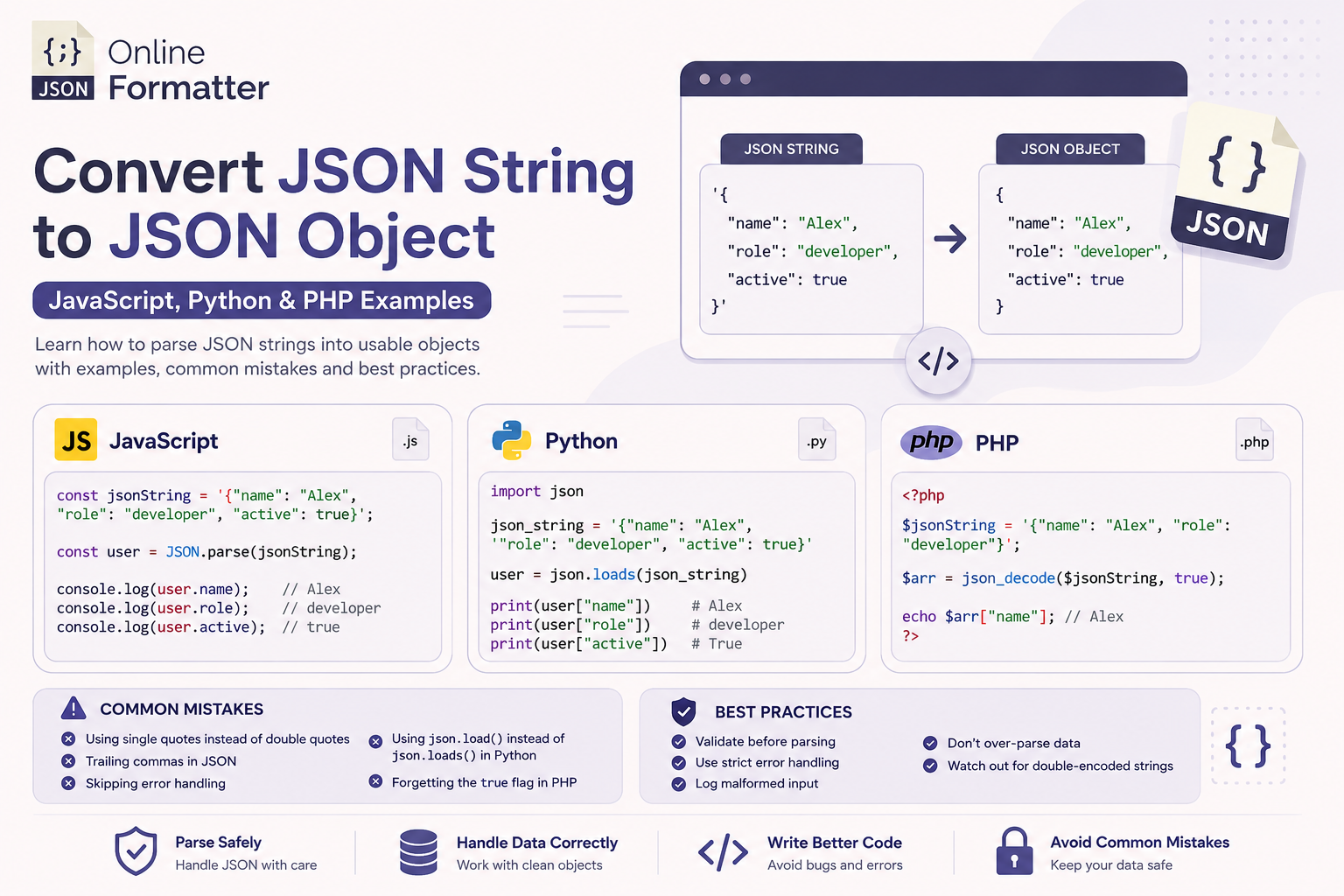
A JSON string is just text. It looks like structured data, but your program treats it as one long piece of text:
'{"name": "Alex", "role": "developer"}'A JSON object (or parsed JSON) is actual data your code can work with:
{ name: "Alex", role: "developer" }Once parsed, you can do user.name or user["role"] and it just works.
How to Convert JSON String to JSON Object in JavaScript
JavaScript makes this pretty straightforward with the built-in JSON.parse() method.
Basic JSON Parse Example (JavaScript)
const jsonString = '{"name": "Alex", "role": "developer", "active": true}';

const user = JSON.parse(jsonString);

console.log(user.name);   // Alex
console.log(user.role);   // developer
console.log(user.active); // true
JSON.parse() takes your string and returns a proper JavaScript object. After this, you can access keys with dot notation or bracket notation no extra steps needed.
Handling Nested JSON in JavaScript
Real API responses are rarely flat. Here’s how parsing works with nested data:
const jsonString = '{"user": {"name": "Alex", "address": {"city": "Austin", "zip": "78701"}}}';

const data = JSON.parse(jsonString);

console.log(data.user.name);           // Alex
console.log(data.user.address.city);   // Austin
The parser handles nesting automatically you don’t need to do anything special.
Always Wrap JSON.parse() in a Try-Catch
Here’s where most developers get it wrong.
If the string is malformed or empty, JSON.parse() throws a SyntaxError and crashes your code. Always wrap it:
const rawString = '{"name": "Alex", broken json here}';

try {
  const user = JSON.parse(rawString);
  console.log(user.name);
} catch (error) {
  console.error("Failed to parse JSON:", error.message);
}
This pattern protects your app from unexpected inputs especially when data comes from external APIs or user input.
How to Convert JSON String to JSON Object in Python
Python uses json.loads() that’s loads with an s (for “string”). A very common mistake is using json.load() (without the s), which reads from a file, not a string.
Python json.loads Example
import json

json_string = '{"name": "Alex", "role": "developer", "active": True}'

# Note: Python JSON uses true/false (lowercase), not True/False
json_string = '{"name": "Alex", "role": "developer", "active": true}'

user = json.loads(json_string)

print(user["name"])    # Alex
print(user["role"])    # developer
print(user["active"])  # True
Once parsed, user is a regular Python dictionary. You access values with square bracket notation.
Parsing Nested JSON in Python
import json

json_string = '{"user": {"name": "Alex", "scores": [95, 87, 92]}}'

data = json.loads(json_string)

print(data["user"]["name"])       # Alex
print(data["user"]["scores"][0])  # 95
Nested objects become nested dicts, and arrays become Python lists. It’s very intuitive once you see it in action.
Error Handling in Python JSON Parsing
import json

raw = '{"name": "Alex", bad data}'

try:
    data = json.loads(raw)
except json.JSONDecodeError as e:
    print(f"JSON parsing failed: {e}")
Use json.JSONDecodeError to catch bad input gracefully.
How to Convert JSON String to JSON Object in PHP
PHP uses json_decode() to parse a JSON string. By default, it returns a PHP object but most developers prefer an associative array. You control this with the second parameter.
PHP json_decode Example
<?php
$jsonString = '{"name": "Alex", "role": "developer"}';

// Returns a PHP object (default)
$obj = json_decode($jsonString);
echo $obj->name; // Alex

// Returns an associative array (recommended for most use cases)
$arr = json_decode($jsonString, true);
echo $arr["name"]; // Alex
?>
The true flag is what converts the result into a PHP associative array instead of a stdClass object.
PHP json_decode Associative Array with Nested Data
<?php
$jsonString = '{"user": {"name": "Alex", "tags": ["php", "api", "backend"]}}';

$data = json_decode($jsonString, true);

echo $data["user"]["name"];       // Alex
echo $data["user"]["tags"][0];    // php
?>
Checking for Errors in PHP
PHP won’t throw an exception on bad JSON by default it returns null. Always check:
<?php
$jsonString = '{"name": "Alex", bad data}';

$data = json_decode($jsonString, true);

if (json_last_error() !== JSON_ERROR_NONE) {
    echo "JSON Error: " . json_last_error_msg();
}
?>
json_last_error_msg() gives you a human-readable error very helpful during debugging.
Read More :- JSON to YAML Conversion Guide: Tools, Code Examples & Best Practices
Quick Comparison: JSON Parsing Across Languages
| Language | Function | Returns | Error Handling |
|---|---|---|---|
| JavaScript | JSON.parse() | Object / Array | Throws SyntaxError |
| Python | json.loads() | Dict / List | Raises JSONDecodeError |
| PHP | json_decode(true) | Associative Array | Returns null, use json_last_error() |
Common Mistakes When Parsing JSON Strings
1. Single Quotes Instead of Double Quotes
JSON requires double quotes for keys and string values. Single quotes will break the parser in every language.
// ❌ Invalid JSON
{'name': 'Alex'}

// ✅ Valid JSON
{"name": "Alex"}
2. Trailing Commas
A classic one:
// ❌ Invalid trailing comma after last item
{
  "name": "Alex",
  "role": "developer",
}

// ✅ Valid
{
  "name": "Alex",
  "role": "developer"
}
3. Skipping Error Handling
Never assume the string is valid. APIs change, data sources have edge cases, users send weird inputs. Always wrap your parse call.
4. Using json.load() Instead of json.loads() in Python
json.load() reads from a file object. json.loads() reads from a string. If your data is a string variable, always use loads.
5. Forgetting the true Flag in PHP
If you don’t pass true to json_decode(), you get a stdClass object. That’s fine sometimes but it breaks code expecting an array.
Read More :- JSON to Table: Complete Step-by-Step Guide to Convert JSON Data into Tables
Best Practices for JSON Parsing
- Validate before parsing If you’re accepting user input or third-party data, run it through a JSON validator first during development.
- Use strict error handling Always catch or check for errors. A silent failure is harder to debug than a loud one.
- Log malformed input When you catch a parse error, log the raw string. It saves hours in debugging.
- Don’t over-parse If your framework already deserializes API responses (like Axios in JS or Requests in Python), you might not need to parse again.
- Watch out for double-encoded strings Sometimes a string gets JSON-encoded twice. If parsing gives you another string instead of an object, parse it once more.
Real-World Use Cases
API Response Handling
Most REST APIs return JSON strings. After fetch() in JavaScript, you call .json() which internally parses the response body.
LocalStorage in JavaScript
localStorage stores everything as strings. When you save an object, you stringify it. When you retrieve it, you parse it back.
// Save
localStorage.setItem("user", JSON.stringify({ name: "Alex" }));

// Retrieve
const user = JSON.parse(localStorage.getItem("user"));
Webhook Payloads in PHP
Webhooks from Stripe, GitHub, or Shopify send raw JSON in the request body. PHP’s json_decode() on file_get_contents("php://input") is a standard pattern here.
Config Files in Python
Many Python apps read JSON config files with json.load(), but when configs are passed as env variables or strings, json.loads() handles them cleanly.
Useful Tools
- JSON Formatter & Validator Paste your string, instantly see if it’s valid JSON and where errors are.
- JSONLint Clean, simple validator. Great for debugging API responses.
- JSON to YAML Converter Useful when you need to switch between formats for config files.
- Browser DevTools The Network tab shows parsed API responses. Right-click → Copy as fetch to grab the raw string.
Conclusion
Converting a JSON string to a JSON object is one of those things every developer does constantly but gets wrong just often enough to cause frustration.
The core idea is simple:
- JavaScript →
JSON.parse() - Python →
json.loads() - PHP →
json_decode($str, true)
What separates good production code from brittle scripts is the error handling. Wrap your parsers, validate your input, and log failures.
Whether you’re handling API responses, reading from storage, or processing webhooks once you’ve got the parsing pattern down with solid error handling, this stops being a source of bugs entirely.

