
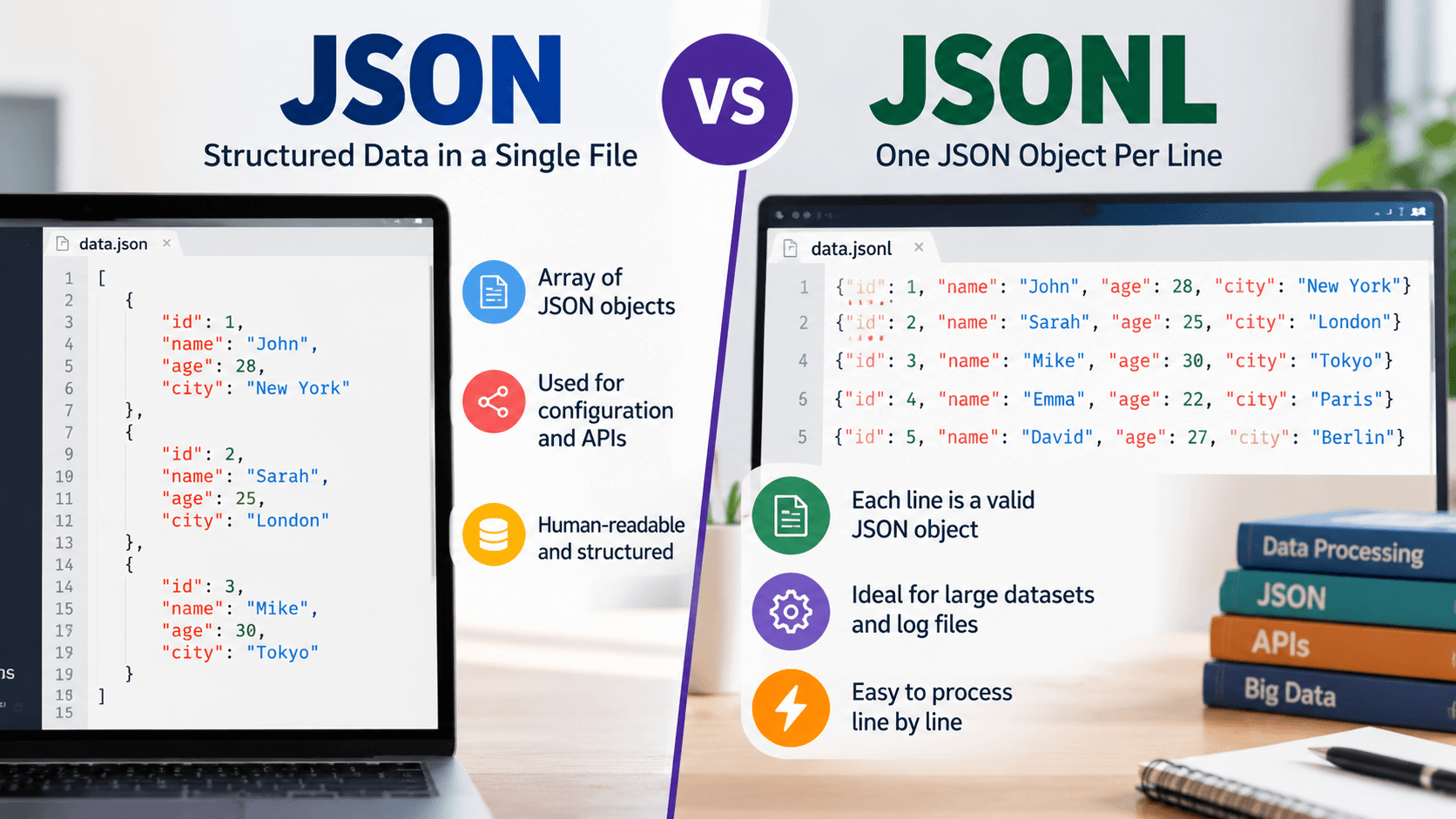

JSONL, or JSON Lines,s is a typical JSON format in which each line is a valid JSON value. The JSONL file normally has a JSONL extension, and each line is separated by \n. JSONL allows streaming or attending to each record separately at a time, while a regular JSON file comes as a single document.
In this blog post, we will explore JSONL in depth.
What Is JSONL?
JSONL is the abbreviation for JSON Lines. JSONL is also called newline-delimited JSON or NDJSON. The idea behind this is to make each line complete with one JSON value and use the line breaks as separators between records.
Three requirements that JSONL needs to fulfill include the following:
- It must follow UTF-8 encoding.
- Each line should be valid as a JSON value.
- \n should work as a line separator.
JSONL vs JSON: What’s the Difference?
Though both JSON and JSONL are similar in syntax, their differences lie in how they organize the file.
- As for the structure, JSON provides a single document that often looks like a big object or array. In JSONL, one value for each independent line is presented.
- For decoding a JSON file, we need to parse the whole document together, while JSONL requires reading and parsing every single line separately.
- When it comes to memory use, JSON memory consumption depends on file size, while JSONL has a smaller memory footprint when you process a single line at a time.
- For adding a record in JSON, the closing bracket needs to be rewritten or edited. In JSONL, appending a record requires just adding a line at the end.
- JSON behaves awkwardly while streaming, while JSONL streams naturally.
- A bad record can break a whole JSON file during parsing, while in the case of JSONL it only results in breaking a line.
- As for readability, JSON indents show nesting, while JSONL shows one record per line.
- JSON is typically used for small datasets, APIs, and configuration files. JSONL is the right format for larger datasets, system logs, batch data, and data pipelines.
Common JSONL Use Cases
As we have mentioned already, JSONL format typically fits into larger datasets, batch data, data pipelines, and system logs. Let’s look at the different JSONL use cases one by one.
- The input files used by LLMs for batch execution, training, and fine-tuning data are JSONL.
- Since JSONL allows easy and safe appending of records by just adding a line, JSONL is preferred for system logs and event streams.
- JSONL, allowing line-by-line data ingestion, is preferred by search engines and data tools.
- When APIs return a long list of items, the streaming ability of JSONL comes in handy.
- JSONL is also considered to be the right format for machine learning datasets. A single example for each line allows easy shuffling, splitting, sampling, and counting of records using any command-line tool.
JSONL Best Practices
- End the file with a newline. It makes appending and concatenating files safe.
- Give records an ID. Line numbers shift when you filter or shuffle.
- Keep a consistent shape. JSONL allows different keys per line, but your future self will thank you for sticking to one schema.
- Compress big files. .jsonl.gz works well with streaming tools.
- Validate as you read. Log the line number of every failed record, and handle bad lines on purpose.
Ending Notes
So, there’s actually no hard choice to make. Both JSON and JSONL are equally relevant. One fits regular use cases like API responses and configuration documents, while the other is more useful for larger databases. When you need to parse a large file, JSONL has a clear advantage over JSON.
Frequently Asked Questions
What is JSONL in short?
JSONL, or JSON Lines, is a text format that keeps a JSON value on a separate line.
What is the difference between JSON and JSONL?
A JSON file must be parsed as a whole and at one go. A JSONL file comprises several independent JSON values that can be parsed one at a time.
Is JSONL the same as NDJSON?
Except for a small difference, they are the same. Both organize the values separately on each line. The only difference is that while JSONL uses .jsonl, NDJSON uses .ndjson and the media type application/x-ndjson.
How do I open or view a JSONL file?
Using a text editor, you can open it. In the text editor, run jq . file. Then you can pretty-print each record separately, or turn it into a JSON array and use a JSON viewer. A regular JSON formatter fails on JSONL because it expects a single document.

